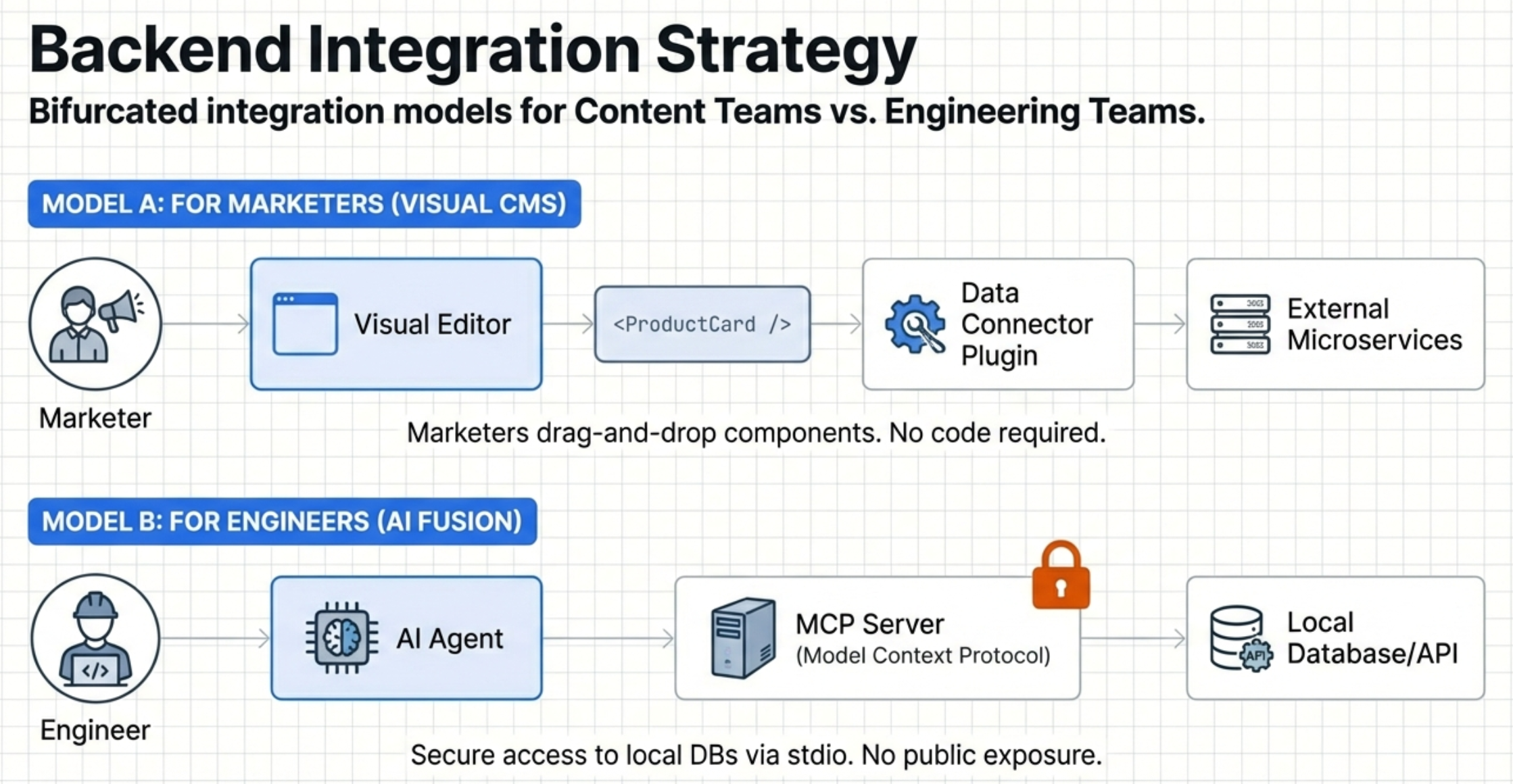
In the modern digital landscape, companies face a persistent GTM “velocity gap.” Marketing teams need to launch campaigns in hours, while agile engineering teams are stretched thin across sprint cycles. Architects and tech leads strive to build modern systems but find themselves consumed by simple “pixel-pushing” requests.
I recently spent a week rigorously evaluating Builder.io across different user personas. This assessment went beyond UI—it was a comprehensive examination of how the platform integrates into complex, high-stakes enterprise environments. What I discovered is that Builder.io isn’t just another CMS; it represents a fundamental shift toward Visual Head architecture, where Builder manages the presentation layer while your existing microservices retain complete control of business logic.
“Separation of Concerns”
From an architectural standpoint, Builder.io’s most critical strength is its commitment to strict Separation of Concerns. The platform is explicitly designed to complement your existing backend infrastructure, not replace it.
By maintaining this architectural divide, your proprietary business logic—pricing engines, payment gateways, product inventory—remains completely decoupled from the presentation layer. Builder acts as a visual composition layer, providing the interface to your services, commerce platform, or headless CMS while your application continues to reside where you host it. You maintain full control over your first-party services and frontend components.
For Marketers: Full Autonomy with Builder Publish Tools
For non-technical teams, the learning curve is remarkably low. Builder Publish empowers marketers and content editors to create and manage digital experiences using a drag-and-drop Visual Editor—no developer dependency for minor changes.
Key capabilities:
- Visual Editor: The interface mimics traditional design tools, allowing users to drag blocks or “registered” custom components onto a canvas
- Targeting & Personalization: Marketing teams can configure different content for specific audiences—mobile vs. desktop, geographic regions, user segments—based on custom attributes passed at runtime
- A/B Testing: Teams can validate content variations and split traffic without code deploys, providing immediate performance data
For Engineering: High Performance with Builder Fusion
While Publish empowers the business side, Builder Fusion delivers the technical capabilities engineers need. Fusion introduces AI-driven workflows that treat AI-generated code as a junior developer—complete with PRs and automated linting.
Technical advantages:
- Zero Lock-in: Fusion generates production-ready code committed directly to your Git repository. You own the code completely—if you ever stop using Builder, the codebase remains yours
- Framework Flexibility: For the best feature parity, I recommend React. However, if raw performance is your primary KPI, Qwik is the optimal choice. Qwik uses “Resumability” to eliminate hydration costs, delivering pure HTML and downloading JavaScript only as needed
- Hybrid Rendering: The architecture prioritizes SSR/SSG with Variant Containers, serving personalized content instantly without breaking the cache. Users see the right version before JavaScript even loads
Key Architecture Characterisitics: Enterprise Security & The Reliability Layer
Enterprise architects typically ask: “What happens when the API goes down?” Builder.io addresses this through a multi-layer caching strategy:
- Global CDN: Content is served from the edge location nearest to each user
- Intermediate Cache: For mission-critical workloads, implement an intermediate cache (Redis, Cloudflare Workers) to ensure 100% uptime even if the primary CMS API is unavailable
- Zero Data Retention (ZDR): Security is architected in from the ground up. Builder leverages a ZDR policy and client-side encryption for AI workflows. Unencrypted code exists in server RAM only during active requests and is discarded immediately after
Recommendation: Start Small with Visual Sections
You don’t need a “rip and replace” strategy. My evaluation suggests a component-based adoption approach:
- Existing Assets: Use Visual Sections to make specific page elements (hero sections, announcement bars, promotional banners) editable. Inject Builder content into your existing app via API without disrupting core routing
- Guardrail Registration: Enforce UX and accessibility standards by registering only pre-approved code components. This gives marketers creative freedom within boundaries where they can’t accidentally compromise the brand
Key Takeaways for Stakeholders
| Feature | Business Value | Technical Implementation |
|---|---|---|
| Visual Head | Marketing agility without dev bottlenecks | Strict separation of concerns via API |
| Fusion (AI) | Accelerated development with code ownership | Git-based CI/CD with AGENTS.md rules |
| Qwik Support | Maximum SEO and PageSpeed scores | “Resumability” instead of hydration |
| Variant Containers | Instant personalization without cache lag | SSR/SSG content filtering on the client |
| ZDR Policy | Protection of proprietary source code | Client-side encryption and RAM-only processing |
My Final Thoughts
After a week of testing these workflows against enterprise-level requirements, Builder.io proves to be far more than a page-building tool—it’s a platform for scaling how companies communicate with their audiences. By adopting a Visual Head architecture and maintaining strict separation of concerns, you empower your marketing team with the speed they demand while preserving the architectural integrity your engineering team requires.